Posts

Showing posts with the label unity

Using Unity to Develop VR experiences -OVR camera

Image
 https://learn.unity.com/tutorial/unit-3-using-unity-to-develop-vr-experiences?uv=2018.4&courseId=5d955b5dedbc2a319caab9a0#5d95596dedbc2a06804dd48e https://learn.unity.com/tutorial/unit-3-using-unity-to-develop-vr-experiences?uv=2018.4&courseId=5d955b5dedbc2a319caab9a0#5d967d9cedbc2a2d9fcf75c0 VRTK - updated in Github  https://github.com/xrsutd/Getting-Started-With-VRTK. Has to be added manually in code. Create Unity project using 2018.4.28 LTS (for the purposes of the tutorial) Download Oculus Integration from the Asset store Package manager Oculus desktop Navigate through explorer to the project packages file. Right click and open 'manifest' text file Copy paste this under the first {add: "scopedRegistries": [  {  "name": "npmjs",  "url": "https://registry.npmjs.org/",  "scopes": [  "io.extendreality"  ]  }  ], add the following entries to the dependencies section  "io.extendreality.vrtk.prefab...

Mixamo in Unity and Bloom post-processing effects

Image
Playing with the bloom post-processing volume effect in Unity, cranked up to create a huge bloom effect behind a Mixamo character. The idea is to have a large group of these figures depicting various gaits in silhouette

Unity - Post-Processing Stack for VR

Image
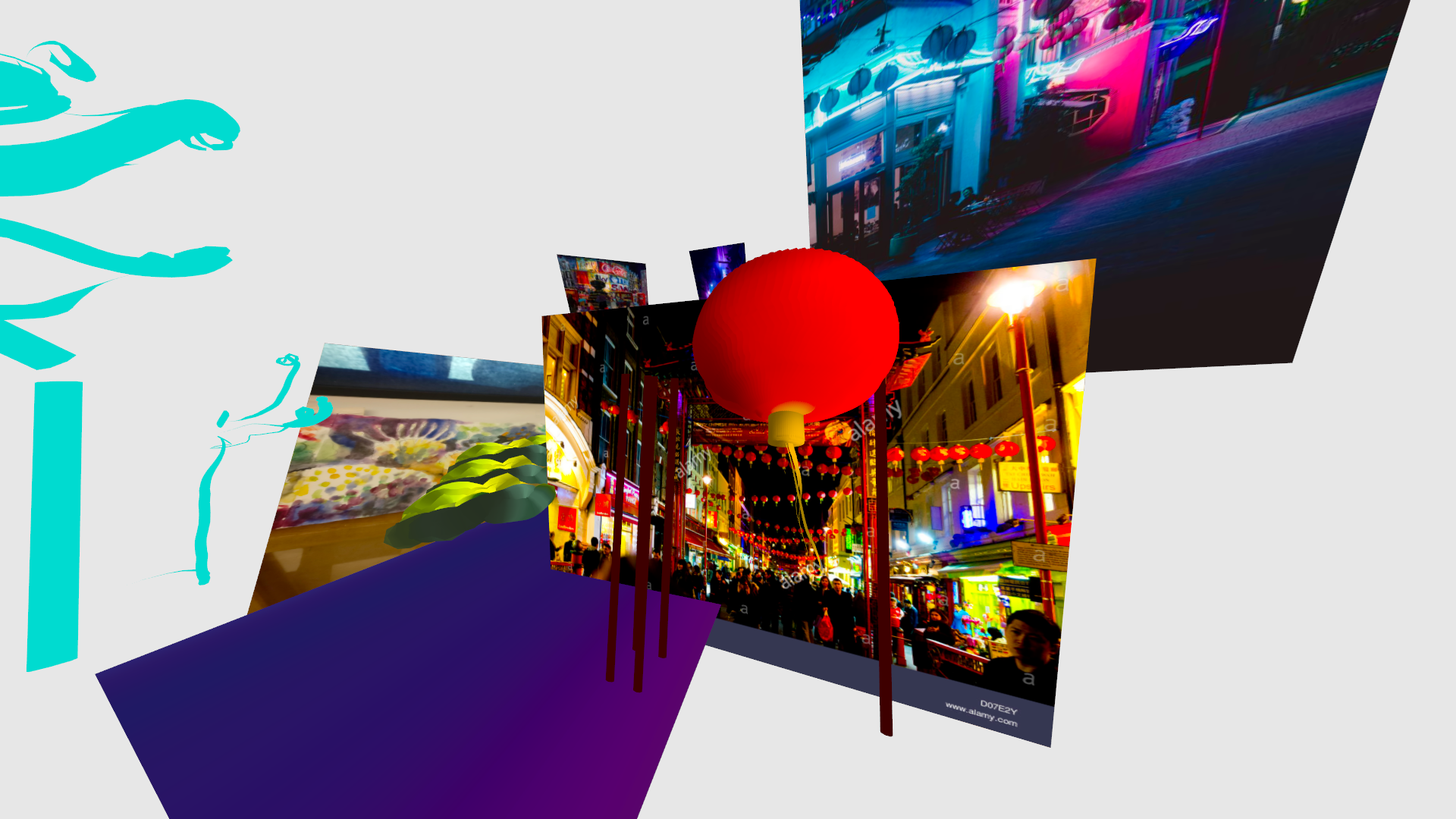
When interviewing Sally and Aaron, I imagined scenes of Piccadilly Circus, neon, trees, tube-lines, commuters, vivid colours against dark backgrounds. I've taken inspiration from this particular blog on the Unity site, which documents a workflow process to rapidly create an environment, using stock assets as much as possible. This is something I discussed at my last supervisory meeting. I aim to use as many stock assets from the Unity store as possible, and making some custom assets in Quill. I am particularly inspired by the idea of importing very rough 3D elements with emissive light qualities, very early on in the creative process; to see the post-processing result as early as possible.. Below is the screen grab of the artist's quick mock up, to see post-processing effects early on. https://learn.unity.com/project/getting-started-with-the-post-processing-stack-for-vr https://blogs.unity3d.com/2017/10/04/neon/ My test below, even though the models are rough tests, unfinished ...

Mixamo to Unity

Importing Mixamo characters into Unity https://youtu.be/P4PrO8fHZ4E

Render pipelines in Unity with unlit shaders

Image
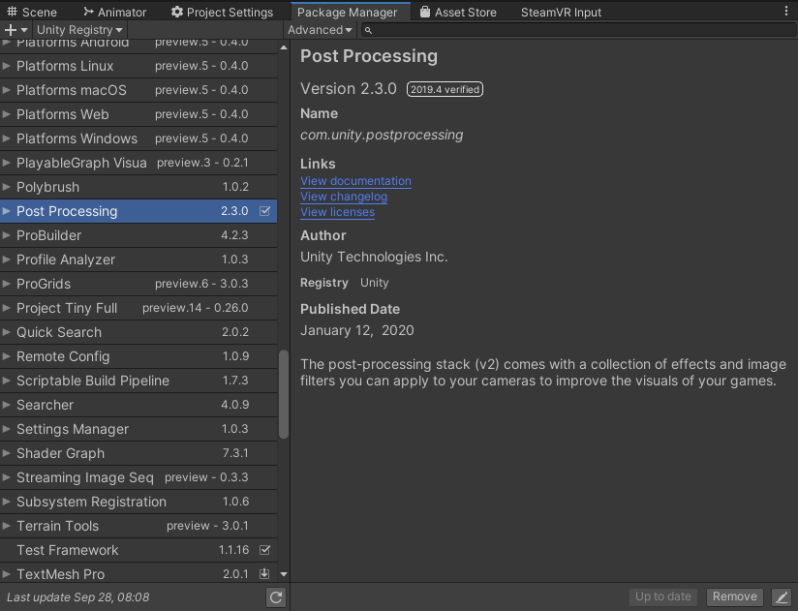
 Great advice and help from the Virtual Animation forum, when I asked what render pipeline to use in Unity, as I want to light my Quill drawings but add bloom and glow effects too. hey @Andrea_McSwan if you don't use a render pipeline you can use the post processing plugin to get bloom and a bunch of other VFX its in the package manager then you just have to put a "Post-process Layer" and "Post-process Volume" on your main camera [ hope that helps!! [ 19:38 ] oh wait a sec the quill shader is unlit... [ 19:39 ] here is a lit shader that you can turn up the emission to get bloom but it will blow out the other colors too If you’re solely trying to get bloom effects you can use any of the render pipelines with the Unlit Quill Shader. HDRP and URP have post processing built in, you just have to create a post process volume and add in bloom. The important thing in URP is making sure that post processing is active on the camera @Andrea_McSwan [

Quill animation in Unity

 https://github.com/kanzwataru/UnityQuillFBXAnim#quillanimcomponent https://www.youtube.com/watch?v=0R6GrWZ5kEY&list=PLR6NkeqscAx2exR5o6eTUmXmh2FbxxOdO&index=4 UnityQuillFBXAnim Using Quill FBX animations in a seamless way with Unity   There are two scripts included:   QuillAnimComponent Just drag and drop it onto a Quill FBX scene and press Play. It just works and loops infinitely. Enable/disable the component to play/pause. The simplest one to use for simple situations. Useful for using Unity as a renderer.   QuillAnimNode This is for using Animator state-machines It is mostly aimed at those who use Unity for creating games with Quill assets. Simply add it onto a state inside the Animator, drag-and-drop the desired animation into the slot, and set up your transitions. (make sure to turn off exit time and transition time since there is no blending) It will automatically spawn the animation mesh when playing the game.   If you want ...

Animating in Unity

 https://learn.unity.com/tutorial/working-with-animation-clips#5efefeadedbc2a001f3a0d03

Exporting from Quill into Unity

Image
 https://quill.fb.com/developers/how-to-use-quill-fbx-in-unity Using a curve, duplicated and rotated to create this Chinese lantern. Next step, import into Unity and light. Optimise, hide all other layers and export from Quill as an FBX. Edit>Project settings>8x multi-sampling Import new asset > download Quill shader (in link above). Warning shows mesh has no normals.  Select model and review inspector model tap  https://docs.unity3d.com/Manual/FBXImporter-Model.html Create two new materials >drag Quill shader onto both new materials>one double, one single>set one to double sided in the inspector panel

Environment inspiration using Quill - Unity pipeline

 https://www.othart.com/vrdemo Environment inspiration using Quill and exported into Unity Email reply below from  Oth Khotsimeuang, creator of the above video  of Toyko Streets, stating the workflow he uses between Quill and Unity. I paint- normally like I would in quillVR. I would say most of the light- 95% of it is done in quill via painted vertex lights. I'm also a painter so all of the colors is painted by hand. We only bring it into unity to throw glow or bloom shaders on it- ALSO the unity camera is better. We use the unit camera to do a steady smooth camera motion so we don't make the people motion sick- with our own handi-cam in quill.   Then we import the objects into Unity and put a vertex shader on it. Then I export the camera- in unity into flat images- sometimes at 30fps when converting it for Premiere- avi or movs.   (see the link below for dealing with FBX files. https://quill.fb.com/developers/how-to-use-quill-fbx-in-unity ...

Exporting painting from Quill VR into Unity

Image
 Test animation in Quill using the nudge over time tool and animation paint brush... Exporting the tree from Quill into Unity Painting in Quill Exported into Unity  https://youtu.be/0R6GrWZ5kEY

Quill animated alembic in Unity

 https://quill.fb.com/developers/how-to-use-quill-animated-abc-in-unity

Prototype - Environment 1. Bespoke skybox using concept art

Image
  Create a grid in Photoshop using a transparent background 8192 x 6144. Create square 2048 x 2048 on new layer. Drag guides to edges of square. Reposition guides. Duplicate square and create more guides. Import images or create new in each box. Note: Middle band = Left. Front. Right. Back          Top          Bottom Save as .png in assets folder. Select .png and in inspector mode, select advanced wrap mode/Clamp. See previous tutorial re creating a new skybox. Select  new material and rename (new skybox). Select and drag and drop png files to corresponding sides. Note: swap right and left.

Making a skybox in Unity

Image
Beginning the process of replicating the concept art below into Unity My scene in Unity was missing the skybox - realised that the scene panel must have a button setting, similar to Maya. I think I'd inadvertently turned it off when using the asset store, during the creating a game in Oculus Quest tutorial. Left - scene showing the skybox Right - my scene with no skybox visible I found out, through viewing a forum, that the skybox visibility button was turned off.  Imported new skyboxes, via the asset store, to see if a midnight sky might work, using the link below. The skybox settings are too light - even using a midnight sky. I don't want sky, stars or much light penetration. Therefore, I am going to custom make a skybox in photoshop, by creating a new material and applying it to a shader. Assets tab>create material>shader>(drop down option) Skybox6sided  Researched how to make a custom skybox in photoshop https://docs.unity3d.com/560/Documentation/Manual/HOWTO-UseS...

Lighting in Unity

Image
Lighting in Unity tutorials Verbatim extracts from  https://learn.unity.com/tutorial/introduction-to-lighting-and-rendering#5c7f8528edbc2a002053b528 Global illumination , or ‘GI’, is a term used to describe a range of techniques and mathematical models which attempt to simulate the complex behaviour of light as it bounces and interacts with the world. Simulating global illumination accurately is challenging and can be computationally expensive. Because of this, games use a range of approaches to handle these calculations beforehand, rather than during gameplay Realtime Lighting By default, lights in Unity - directional, spot and point, are realtime. This means that they contribute direct light to the scene and update every frame. As lights and GameObjects are moved within the scene, lighting will be updated immediately. This can be observed in both the scene and game views. Baked GI Lighting When 'baking’ a ‘lightmap', the effects of light on static objects in the scene are...